Gigabyte to Terabyte Formula
To convert gigabytes to terabytes, divide the number of gigabytes by 1,000.
Terabytes = Gigabytes ÷ 1,000
You can also multiply the gigabyte value by 0.001:
GB × 0.001 = TB
1,000 GB = 1 TB
Common Gigabyte to Terabyte Values
| Gigabytes | Terabytes |
|---|---|
| 1 GB | 0.001 TB |
| 5 GB | 0.005 TB |
| 10 GB | 0.01 TB |
| 25 GB | 0.025 TB |
| 50 GB | 0.05 TB |
| 100 GB | 0.1 TB |
| 250 GB | 0.25 TB |
| 500 GB | 0.5 TB |
| 750 GB | 0.75 TB |
| 1,000 GB | 1 TB |
| 1,024 GB | 1.024 TB |
| 1,500 GB | 1.5 TB |
| 2,000 GB | 2 TB |
| 5,000 GB | 5 TB |
| 10,000 GB | 10 TB |
SSD Storage: From Gigabytes to Terabytes
What is an SSD?
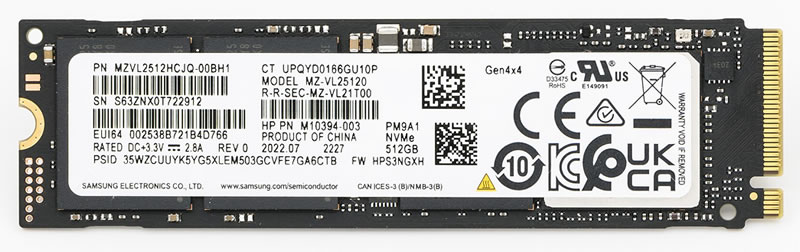
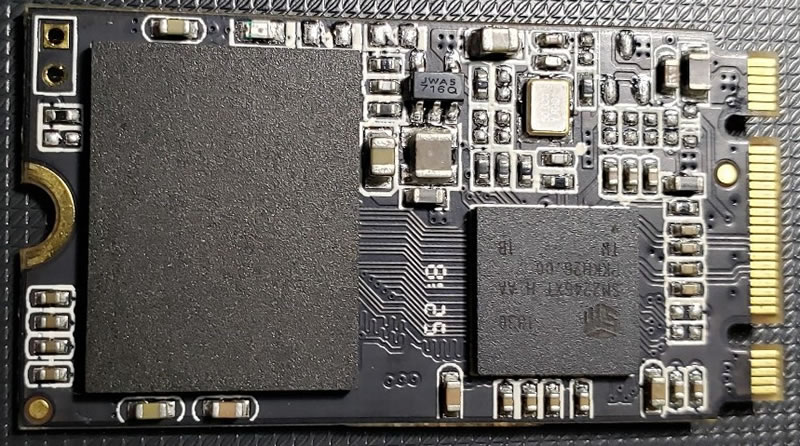
An SSD, or solid-state drive, is a storage device that normally uses NAND flash memory to preserve files, applications, and operating-system data. Unlike RAM, an SSD retains its contents when the power is switched off. Unlike a hard disk drive, it does not use spinning platters or a moving read-and-write head.
SSD capacity is commonly measured in gigabytes and terabytes. Using decimal storage units, 1 TB equals 1,000 GB. Typical consumer capacities include 256 GB, 512 GB, 1 TB, 2 TB, and 4 TB, while enterprise drives can hold tens or even hundreds of terabytes.
| Advertised capacity | Decimal equivalent | Typical use |
|---|---|---|
| 256 GB | 0.256 TB | Operating system and everyday applications |
| 512 GB | 0.512 TB | General home, school, and office computing |
| 1 TB | 1,000 GB | Games, photographs, applications, and documents |
| 2 TB | 2,000 GB | Large game libraries and creative projects |
| 4 TB | 4,000 GB | Video production, workstations, and local backups |
| 8 TB | 8,000 GB | Professional media and high-capacity storage |
A brief history of solid-state drives
Early commercial solid-state storage appeared in the 1970s, but it was extremely expensive and intended for specialist systems requiring high speed or resistance to vibration. One early enterprise SSD introduced in 1978 stored only 45 MB and cost hundreds of thousands of dollars.
Flash memory transformed the technology. Fujio Masuoka developed flash memory while working at Toshiba during the early 1980s. In 1991, SunDisk, later renamed SanDisk, demonstrated a flash-based SSD module for IBM. An early 2.5-inch product offered approximately 20 MB of storage as a replacement for a mechanical laptop drive.
High-volume laptops using flash-based SSDs began appearing in the mid-2000s. Capacity increased while prices fell, making SSDs practical for ordinary computers. The Computer History Museum's SSD history describes this development from specialist equipment to mainstream storage.
SSD Capacity: From Gigabytes to Terabytes
Why is an SSD better than an HDD?
An SSD can retrieve data without waiting for platters to rotate or a mechanical head to move. This generally produces faster startup, shorter application-loading times, quicker file transfers, and more responsive multitasking. NVMe SSDs connected through PCI Express can be substantially faster than both hard drives and older SATA SSDs.
Removing mechanical parts also makes SSDs silent, compact, and more resistant to shocks. They usually consume less electricity and produce less heat than HDDs, making them particularly suitable for laptops, portable devices, and high-performance servers.
SSDs are not better in every situation. Hard drives usually provide more capacity for the same price and remain economical for large archives, surveillance recordings, and infrequently accessed backups. Flash cells also have limited write endurance, although modern wear-leveling and error correction make reputable SSDs dependable for normal use. Important data should always be backed up regardless of drive type.
Current SSD development
Modern SSD development focuses on greater density, higher transfer speeds, improved energy efficiency, and larger capacity. Three-dimensional NAND stacks memory cells vertically, allowing manufacturers to store more data without making a drive physically larger. TLC stores three bits per cell, while QLC stores four, reducing cost per gigabyte but introducing trade-offs in performance and endurance.
NVMe and successive PCI Express generations continue to improve bandwidth and latency. In data centers, high-capacity SSDs are increasingly used for databases, cloud services, content delivery, and AI workloads that require rapid access to large datasets. For example, Micron announced a 122 TB data-center SSD using ninth-generation 3D NAND in 2025, illustrating how far the industry has moved beyond early megabyte-scale devices. More details are available in Micron's data-center SSD announcement.