Terabyte to Gigabyte Formula
To convert terabytes to gigabytes, multiply the number of terabytes by 1,000.
Gigabytes = Terabytes × 1,000
1 TB = 1,000 GB
Common Terabyte to Gigabyte Values
| Terabytes | Gigabytes |
|---|---|
| 0.1 TB | 100 GB |
| 0.25 TB | 250 GB |
| 0.5 TB | 500 GB |
| 0.75 TB | 750 GB |
| 1 TB | 1,000 GB |
| 1.5 TB | 1,500 GB |
| 2 TB | 2,000 GB |
| 2.5 TB | 2,500 GB |
| 3 TB | 3,000 GB |
| 4 TB | 4,000 GB |
| 5 TB | 5,000 GB |
| 8 TB | 8,000 GB |
| 10 TB | 10,000 GB |
| 16 TB | 16,000 GB |
| 20 TB | 20,000 GB |
Hard Disk Drives: From Gigabytes to Terabytes
What is an HDD?
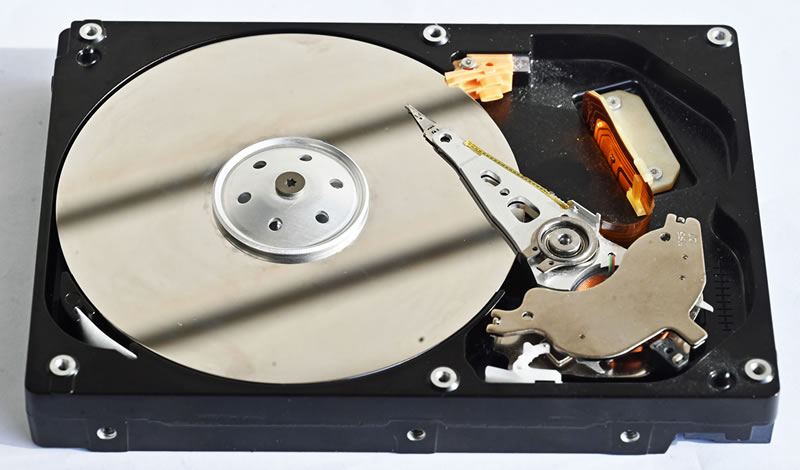
A hard disk drive, usually called an HDD, is a storage device that saves data magnetically on spinning disks called platters. A moving read-and-write head accesses documents, photos, videos, applications, and other files stored on those platters. Unlike RAM, an HDD keeps its data when the computer is turned off.
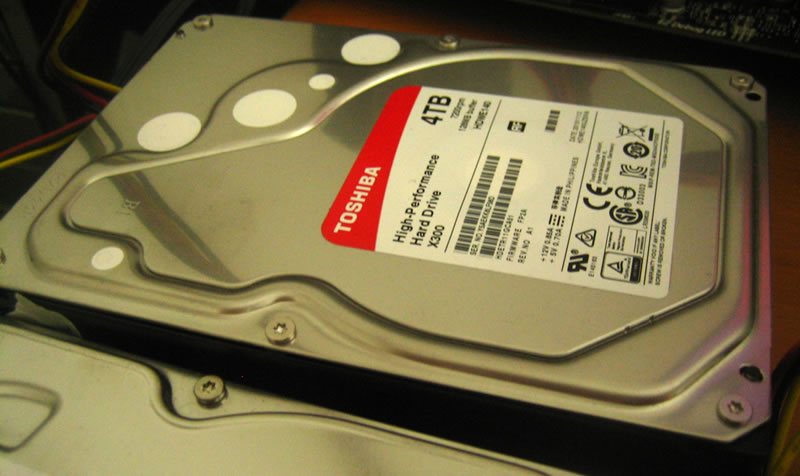
HDD capacity is normally advertised in gigabytes and terabytes. Manufacturers use decimal units, so 1 terabyte (TB) equals 1,000 gigabytes (GB). A 500 GB drive therefore provides half the advertised capacity of a 1 TB drive, while an 8 TB drive contains 8,000 GB. The capacity displayed by an operating system may appear lower because some systems calculate storage using binary units and space is also required for formatting.
A Short History of the Hard Drive
The first commercial hard disk drive was introduced by IBM in 1956 as part of the IBM 305 RAMAC computer. Its Model 350 disk-storage unit used 50 large platters, weighed more than a ton, and stored only a few megabytes of information. Despite its size, it was revolutionary because it allowed records to be accessed directly instead of being read sequentially from magnetic tape. Learn more from the Computer History Museum and IBM’s RAMAC history.
Hard drives became smaller and more affordable during the following decades. The 3.5-inch format became common in desktop computers, while 2.5-inch drives were widely installed in laptops. Early personal computers often had drives measured in megabytes. By the 1990s and 2000s, gigabyte capacities were becoming standard. In 2007, Hitachi announced the first 1 TB hard drive, marking the beginning of widely available terabyte storage.
Common HDD Capacities
- 500 GB: suitable for documents, basic applications, and smaller media collections.
- 1–2 TB: common for home computers, games, photographs, and personal backups.
- 4–8 TB: useful for large video libraries, surveillance systems, and home servers.
- 10 TB and above: commonly used in NAS devices, data centers, cloud infrastructure, and long-term archives.
HDD drive in Terabytes and Gigabytes
How HDD Technology Is Developing
Modern development focuses on placing more data onto each platter. Technologies such as shingled magnetic recording (SMR) overlap data tracks to increase capacity, while heat-assisted magnetic recording (HAMR) uses controlled heat to write smaller and more stable magnetic regions. Some high-capacity drives are filled with helium, reducing air resistance and allowing more platters to operate efficiently inside the enclosure.
HDDs remain important for cloud storage, data-center backups, video surveillance, and large media archives. These applications need enormous capacity but do not always require the instant response of an SSD.
When Is an HDD Better Than an SSD?
An HDD is usually better when low cost per terabyte and high capacity matter more than speed. It can be an economical choice for backups, archived projects, security-camera recordings, media libraries, and network-attached storage. Buying several terabytes of HDD storage generally costs less than purchasing the same SSD capacity.
An SSD is still the better option for operating systems, applications, gaming, and workloads that require fast file access. SSDs have no moving parts, so they are quieter, more resistant to physical shock, and usually faster. Many computers use both technologies: an SSD for frequently accessed programs and an HDD for inexpensive bulk storage. Whichever drive you choose, keep a separate backup because both HDDs and SSDs can fail.