Megabyte to Terabyte Formula
To convert megabytes to terabytes, divide the megabyte value by 1,000,000.
Terabytes = Megabytes ÷ 1,000,000
You can also multiply by 0.000001:
MB × 0.000001 = TB
1,000,000 MB = 1 TB
Common Megabyte to Terabyte Values
| Megabytes | Terabytes |
|---|---|
| 1 MB | 0.000001 TB |
| 10 MB | 0.00001 TB |
| 100 MB | 0.0001 TB |
| 500 MB | 0.0005 TB |
| 1,000 MB | 0.001 TB |
| 10,000 MB | 0.01 TB |
| 25,000 MB | 0.025 TB |
| 50,000 MB | 0.05 TB |
| 100,000 MB | 0.1 TB |
| 250,000 MB | 0.25 TB |
| 500,000 MB | 0.5 TB |
| 750,000 MB | 0.75 TB |
| 1,000,000 MB | 1 TB |
| 2,000,000 MB | 2 TB |
| 5,000,000 MB | 5 TB |
Memory Cards: From Megabytes to Terabytes
What Is a Memory Card?
A memory card is a small, removable device that stores digital information using flash memory. Because it has no moving parts, it can retain photos, videos, documents and other files without a continuous power supply. Common formats include SD, microSD, CompactFlash and CFexpress cards.
Memory-card capacity has grown from a few megabytes to one terabyte and beyond. Using decimal units, 1 TB equals 1,000,000 MB. An early 8 MB card could hold a modest collection of low-resolution photographs, while a 1 TB card provides 125,000 times as much capacity. However, some of the advertised space is used for formatting and file-system information.
A Short History of Memory Cards
Removable flash-memory cards became increasingly important during the 1990s as digital cameras, handheld computers and portable music players needed compact storage. CompactFlash was introduced in 1994 and became especially popular in professional and consumer cameras.
The SD Association was established by Panasonic, SanDisk and Toshiba in 2000. The first SD cards offered capacities as small as 8 MB. Standard SD cards eventually supported up to 2 GB, followed by SDHC cards with capacities above 2 GB and up to 32 GB.
SDXC extended the range beyond 32 GB and up to 2 TB. The smaller microSD format, originally called TransFlash, was standardized in 2005 after being developed for mobile phones. Early microSD products were available in capacities such as 32 MB, 64 MB and 128 MB.
Today, terabyte-capacity SDXC and microSDXC cards can accommodate high-resolution photographs, games and hours of video. The newer SDUC specification supports potential capacities above 2 TB and up to 128 TB, although a specification’s maximum does not mean every capacity is already commonly available. The SD Association’s capacity guide explains the differences among SD, SDHC, SDXC and SDUC.
Memory card in Megabytes and Terabytes
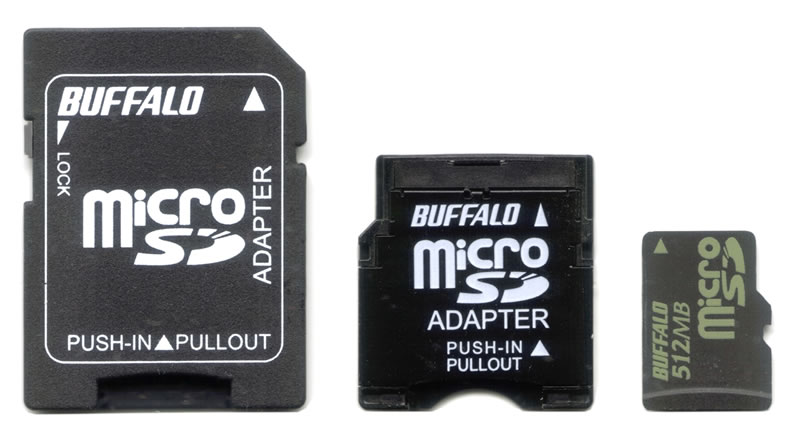
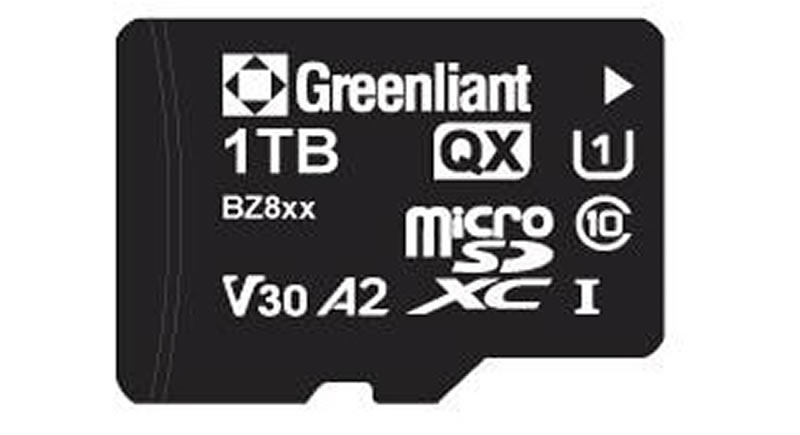
These memory cards illustrate the increase from megabyte-scale to terabyte-scale removable storage. A 512 MB card contains 0.000512 TB, while a 1 TB card contains 1,000,000 MB. The 1 TB card therefore offers approximately 1,953 times as much capacity.
Where Are Memory Cards Used?
Memory cards are widely used in digital cameras, smartphones, drones, action cameras, dashcams, security cameras, handheld game systems, audio recorders and industrial equipment. Professional photographers and filmmakers may use high-speed SDXC or CFexpress cards to record RAW photographs and high-resolution video.
Capacity alone does not determine whether a card is suitable. Cameras and video equipment may require a particular write-speed rating, such as U3, V30, V60 or V90. The device must also support the card’s capacity standard and file system. An older device designed only for standard SD cards may not recognize an SDXC or SDUC card.
Where Are Memory Cards Better Than Other Storage?
Memory cards are better than many other storage types when portability, small physical size and removability are the main priorities. They can add storage to a compatible device without opening it or replacing an internal component. They also consume little power and tolerate everyday movement better than mechanical drives because they contain no spinning platters.
A photographer can replace a full card within seconds and continue shooting, while several cards can be carried in a small protective case. Their standardized shapes also make it convenient to move files between compatible cameras, computers and readers.
Memory cards are not ideal for every purpose. Large hard drives and magnetic tape are usually more economical for extensive archives, while internal SSDs can provide faster and more consistent performance for operating systems and applications. Cards are also easy to lose and have a limited number of write cycles. Important files should therefore be copied to another storage device or backup than kept on only one card.